API Authentication
RegEd requires OAuth 2.0 (mtls + OAuth) authentication mechanism for its API’s. You must fetch token from RegEd to call its APIs.
API Access
Please reach out to sales@reged.com if you want to gain access to RegEd’s APIs for your business use case.
Overview
"mTLS + OAuth" refers to a security mechanism where "Mutual TLS (mTLS)" is used as a method for client authentication within the OAuth 2.0 authorization framework, essentially requiring both the client and the authorization server to verify each other's identities using digital certificates during the connection establishment, significantly enhancing security by preventing unauthorized access to protected resources.
OAuth Flow
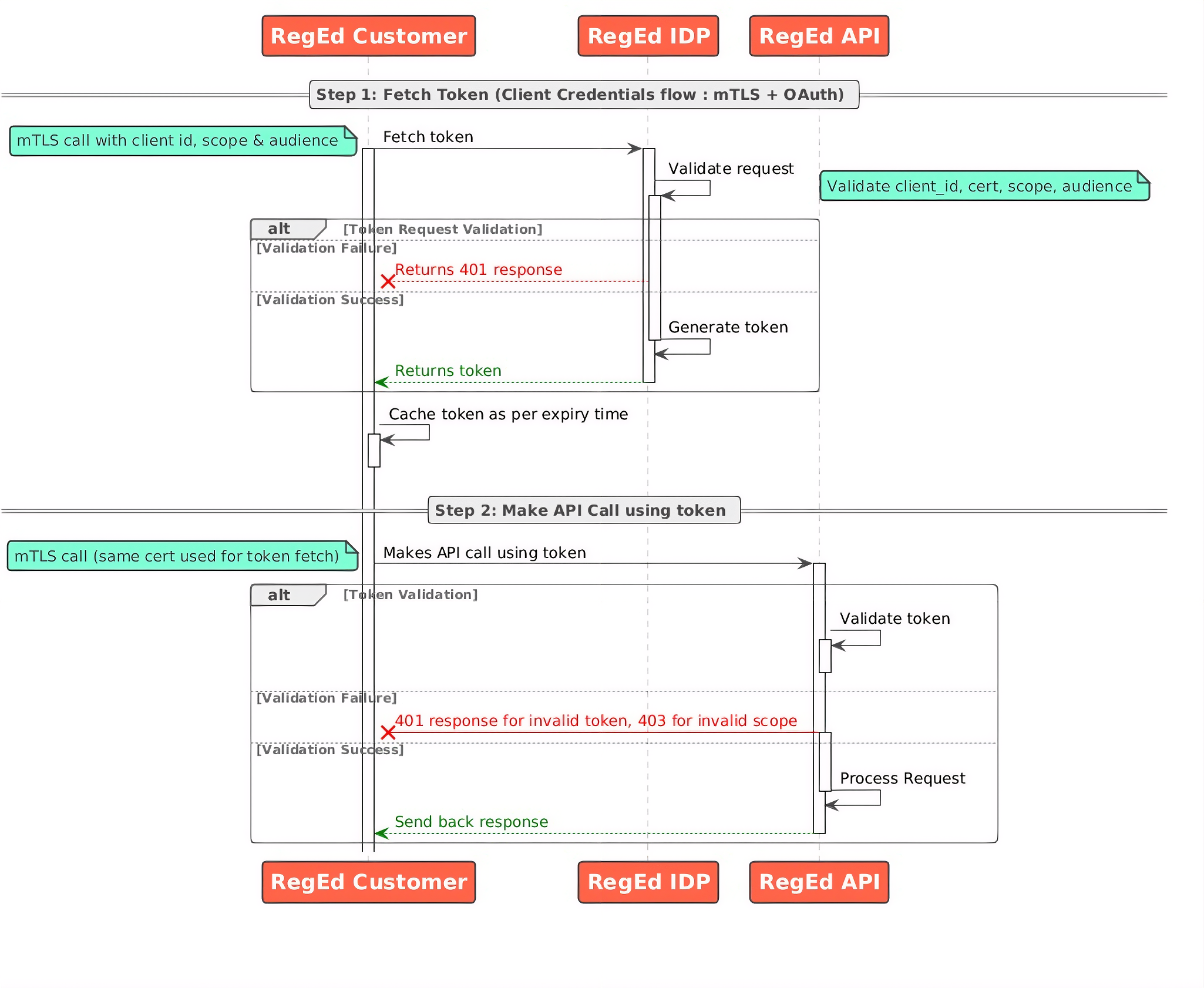
Benefits of mTLS with OAuth
- Stronger client authentication - Compared to traditional OAuth client authentication methods like client secrets, mTLS provides a more robust way to verify the identity of the client application.
- Reduced risk of unauthorized access - By binding access tokens to client certificates, it becomes significantly harder for malicious actors to use stolen tokens.
- Enhanced security - By using mTLS, OAuth flows gain an extra layer of protection as only clients possessing the correct private key corresponding to their certificate can access protected resources.
OAuth Token Endpoints
OAuth Token endpoints are used to retrieve the bearer token.
| Environment | Endpoint |
|---|---|
| UAT | https://mtls.auth-uat.reged.com/oauth/token |
| PROD | https://mtls.auth.reged.com/oauth/token |
API Endpoints
| Environment | Endpoint |
|---|---|
| UAT | https://uatapi.reged.com |
| PROD | https://api.reged.com |
Fetching and using the Token
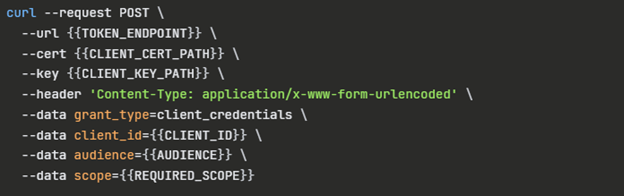
Step 1 - Get Token
- HTTP “POST” Call URL: OAuth Token Endpoint
- Use your cert file and key file or your pfx file with password
- Authorization: No Auth
- Body: x-ww-form-urlencoded
- Key-Value pairs:
| Key | Description | Notes |
|---|---|---|
| client_id | Client ID assigned to your account | Provided by RegEd Professional Services Team |
| grant_type | Represents the grant type | client_credentials |
| audience | API Audience | Provided by RegEd Professional Services Team |
| scope | API Auth Scope | Provided by RegEd Professional Services Team |
Request
Responses
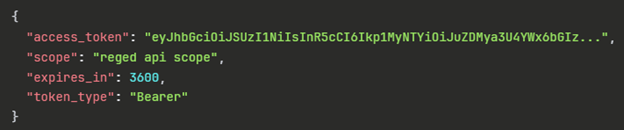
| Key | Description |
|---|---|
| access_token | Token to be used for API calls |
| scope | Level of access granted |
| expires_in | 3600 seconds or 1hr |
| token_type | Always Bearer |
Step 2 - API Call
Use the “access_token” value from the response generated in Step 1. Use it as the bearer token in the call to the respective API.
- Authorization: Bearer Token
Token Expiration
Tokens are valid for 1 hr. in production and for 15 mins in UAT.
Best Practices
It is highly recommended to cache and reuse the tokens for API calls during this duration. In Memory Cache providers or Distributed Cache Providers like Redis can be used effectively to cache tokens with ttl(time to live). Time to live should set based upon the “expires_in” value in the response. It can be always reduced by a safe margin of few mins which makes sure that you always have a valid token.